An email's journey
📖 In short
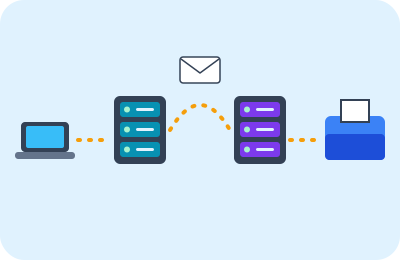
You write a message to your grandmother and press “Send”, and seconds later it reaches her inbox in another city. But the message doesn't jump straight from your computer to hers: it passes through many stops, like a paper letter going through the post office, the van and the postman.
🤩 Did you know?
- If you type the address wrong, the server sends the message back to you with a note saying it couldn't find the person.
- The “spam” folder collects messages the server thinks are ads or tricks.
- The same message can be sent to many people at the same time.
- Emails can stay stored on servers for many years.
🔎 Find out more
🌟 1. Writing and sending
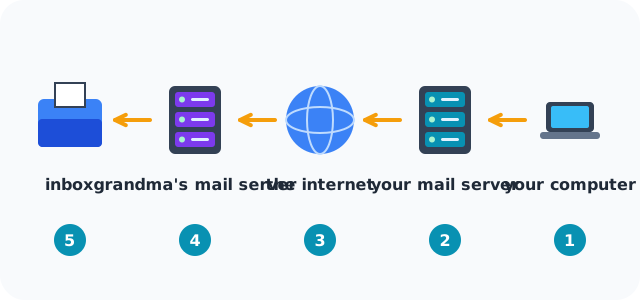
You write the address, subject and text, then press “Send”. The email program takes your message and sends it to your “mail server”, which is like the post office in your neighborhood.
🔍 2. Finding the address
Your server looks at what comes after @ in your grandmother's address, then asks the internet directory: where is the mail server for this name? And it gets its address.
💡 3. Travelling across the internet
The message is split into small packets that travel through routers and cables, perhaps each by a different route, then they all come together at your grandmother's mail server.
🎯 4. The inbox
Your grandmother's server keeps the message in her inbox even if her computer is off. When she opens her email, her program asks the server for new messages, and your message appears!
🧭 Return to sender
If the server can't find the person, it sends you an automatic message saying the message didn't arrive. Check the address letter by letter, because one small mistake is enough to lose it.
🌈 A check before it arrives
Before the message reaches the inbox, the receiver's server checks it: does it have a virus? Does it look like a trick message? If it's suspicious, it goes into the “spam” folder.
📊 See how it works
📚 Key words
- Mail server
- A computer that sends and stores messages
- inbox
- Where new messages go
- Packet
- A small piece of the message
🧪 Try it at home
Act out the message's journey: put signs saying “your computer”, “your mail server”, “the internet”, “Grandma's mail server” and “inbox” in rooms around the house, and carry an envelope from stop to stop, explaining what happens at each one.
🧩 Test yourself
1 Where does the message wait until your grandmother opens her email?
2 What happens if you type the address wrong?
📚 Read next
- 🌐 The internet: a network that connects the world
- 🔍 How does a search engine find the answer?
- 🗄️ The server: a computer that serves everyone
- 🏷️ How does the browser find a website? Addresses and domain names
- 🧭 How is a web page made?
- 📶 Networks and Wi-Fi: from home to the world
- 💻 What is a computer?