Coding: how do we talk to a computer?
📖 In short
Coding means writing instructions that a computer understands and carries out. Every game you play and every app on a phone was written line by line by programmers. And the good news is that children can learn to code too; some make their first games at the age of eight!
🤩 Did you know?
- Some big games have millions of lines of instructions.
- The Scratch language was designed especially for children, and millions of children around the world use it.
- The Python language isn't named after the snake but after a comedy show its inventor loved.
- The robots roaming Mars run programs written by programmers on Earth.
🔎 Find out more
🌟 Programming languages
A computer doesn't understand English or Arabic, so people invented “programming languages” with exact words and rules, like Python and JavaScript. In the end they're translated into the 0s and 1s the computer understands.
🔍 Coding with blocks
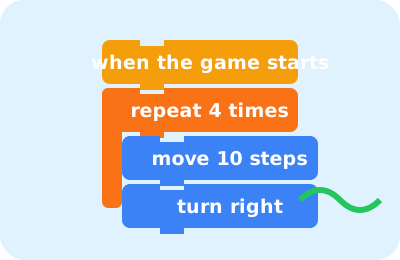
For younger children there are languages like Scratch, where you code by dragging colorful blocks and snapping them together like Lego bricks: “move 10 steps”, “repeat 4 times”, “if touching the color red”. With these blocks we make games and animated stories.
💡 Three magic ideas
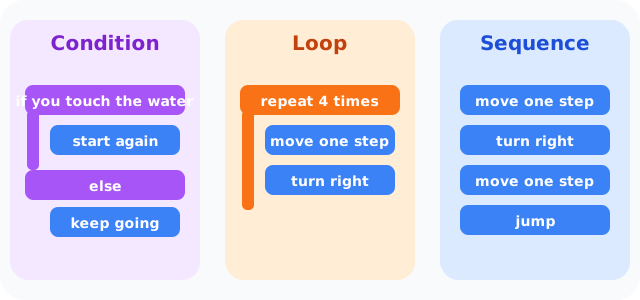
Almost every program uses three ideas: sequence (step after step), loop (do these steps several times) and condition (if this happens, do that). With these three ideas we build the most complicated games!
🎯 Programmers learn from their mistakes
Nobody writes a perfect program the first time. The programmer tries it, looks at the result, fixes it and tries again. Coding teaches us patience and thinking step by step.
🧭 Variables: boxes with names
In games we need to keep track of points and lives. The programmer uses a “variable”: a box with a name like “score”, where we put a number and change it whenever the player scores.
🌈 Events
“When the space bar is pressed, jump”: that's an “event”. The program waits for something to happen, like a key press or a tap on the screen, then runs the commands linked to it.
📊 See how it works
📚 Key words
- Sequence
- Running commands one after another
- Loop
- Repeating commands several times
- Condition
- Running commands only if something is true
- Variable
- A named box where we keep a value
🧪 Try it at home
Play “robot and programmer”: one of you is the programmer and gives only short commands (move one step, turn right), and the other is the robot who follows them exactly until reaching treasure hidden in the room.
🧩 Test yourself
1 In coding, what do we call “do these steps several times”?
2 What does a programmer do when there's a mistake in their program?