How does a computer work?
📖 In short
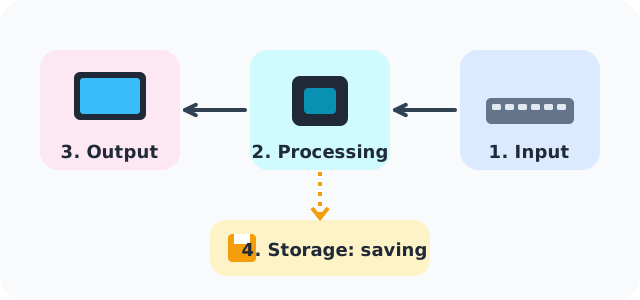
Everything a computer does goes through four stages: we put information in, it processes it, it gives us the result, and it stores what we'll need later. When you type a letter and see it on the screen, all four stages have happened in a tiny fraction of a second!
🤩 Did you know?
- A touch screen is an input and output device at once: it shows the picture and feels your finger at the same time.
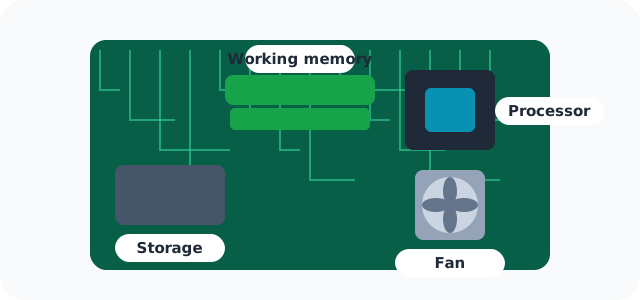
- The processor gets hot from all its work, which is why there's a small fan inside the computer to cool it.
- In many programs the “Save” icon is shaped like a floppy disk 💾, an old disk that hardly anyone uses anymore.
- The first computer mouse was made in the 1960s, and it was a wooden box!
🔎 Find out more
🌟 1. Input
Input devices carry information from us to the computer: the keyboard sends letters, the mouse sends your hand's movement, the microphone sends your voice and the camera sends your picture.
🔍 2. Processing
The processor is the computer's brain. It receives information, does the calculations and decides what happens next, billions of times every second. And it's a small piece about the size of a postage stamp!
💡 3. Output
Output devices carry the result from the computer to us: the screen shows pictures, the speaker plays music and the printer puts words on paper.
🎯 4. Storage
Storage keeps your photos, games and homework even after the computer is switched off. That's why we click “Save” before closing a program, or what we wrote is lost.
🧭 Inside the box
If we open up a computer (with a grown-up!), we see the “motherboard”: a big board that all the parts connect to, like a little town whose streets are thin copper lines where electricity travels.
🌈 Two different memories
Working memory is very fast but is wiped when the computer is switched off; storage is a little slower but keeps files for many years.
📊 See how it works
📚 Key words
- Processor
- The computer's brain, which calculates and decides
- Motherboard
- The board that connects all the computer's parts together
- Working memory
- Fast, temporary memory that's wiped at switch-off
🧪 Try it at home
Act out a computer with your friends: one is the “keyboard” and writes a sum on paper, one is the “processor” and works out the answer, one is the “screen” and holds up the answer for everyone, and one is the “memory” and keeps the papers in a box.
🧩 Test yourself
1 Which of these is an input device?
2 Which part do we call “the computer's brain”?
3 Why do we click “Save”?