Where are my files kept? Storage and the cloud
📖 In short
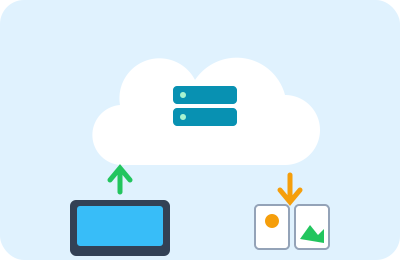
A computer stores photos, games and homework in its memory as 0s and 1s. Some stay inside the computer itself and some are kept far away in “the cloud”. But the cloud isn't in the sky: it's huge computers in big buildings somewhere in the world!
🤩 Did you know?
- Data centers get very hot, so some are built in cold places to cool them down easily.
- In 2018 engineers tried putting a small data center on the seabed so the water would cool it!
- A memory card the size of your fingernail can hold thousands of photos.
- A single letter usually needs only one or two bytes.
🔎 Find out more
🌟 Working memory and storage
Think of your desk and your cupboard: the desk is quick and close, but you clear it at the end of the day, while the cupboard keeps your things for a long time. A computer has fast “working memory” that's wiped at switch-off, like the desk, and “storage” that keeps files, like the cupboard.
🔍 The byte and its family
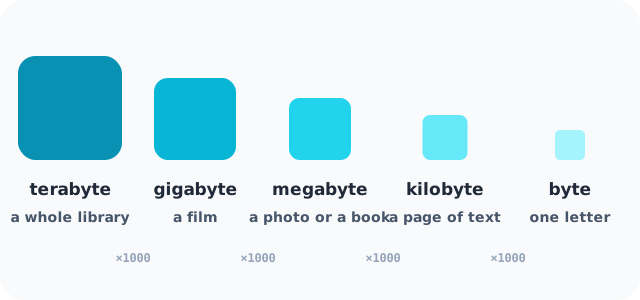
We measure file size in bytes. About a thousand bytes is a kilobyte, enough for a short page of text. A million bytes is a megabyte, the size of a photo. And a billion bytes is a gigabyte, the size of a film.
💡 What is the cloud?
When you save a photo “in the cloud”, it travels over the internet to a “data center”: a building full of thousands of computers working day and night. That way you can open your photo from any device.
🎯 A backup copy
A computer can break or a phone get lost. So people keep a second copy of their important files somewhere else. This copy is called a “backup”.
🧭 Kinds of storage
An old hard disk has platters that spin very fast, while modern drives are electronic chips with no moving parts, faster and quieter. Memory cards and USB sticks are this kind.
🌈 The cloud needs the internet
You need the internet to open what you've saved in the cloud. So we also keep a copy of important files on the device, and choose a strong password for the cloud account.
📊 See how it works
📚 Key words
- Byte
- The unit for measuring the size of information
- Data center
- A building full of servers
- Backup
- A second copy of files that keeps them from being lost
🧪 Try it at home
Compare sizes: a book with no pictures is about one megabyte. Count how many books are on your shelves at home, then imagine a small memory card that can hold thousands of books!
🧩 Test yourself
1 Where are files kept “in the cloud”?
2 Why do we make a backup?