Passwords and viruses
📖 In short
Just as we lock the front door with a key, we protect our computer accounts with a password. And just as a person can catch a virus, a computer can be infected by a harmful program called a “computer virus” that damages files or steals information. The good news: with a few simple habits we can protect our computer and ourselves.
🤩 Did you know?
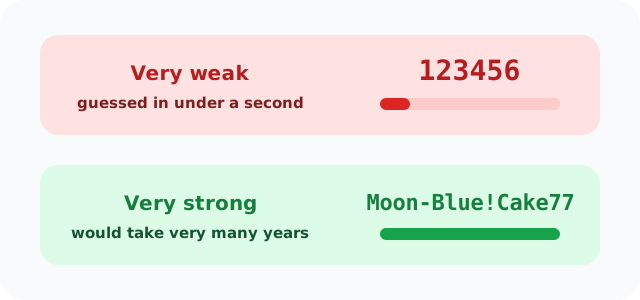
- “123456” is one of the most used passwords in the world, and that's exactly why it's one of the weakest!
- One of the first viruses for personal computers was called “Brain” and appeared in 1986.
- Some trick messages copy the look of well-known websites to steal passwords; this trick is called “phishing”.
- Phones can also be locked with a fingerprint or face recognition.
🔎 Find out more
🌟 A strong password
A strong password is long and has capital and small letters, numbers and symbols, like a sentence nobody could guess. But “123456”, your name or your birthday are easy for anyone to guess.
🔍 A secret we don't share
Only you and your parents know your password; you don't even tell your best friend. And we log out of our account when we use a school computer or someone else's.
💡 What is a computer virus?
A virus is a program written by someone with bad intentions, hidden in an unknown file, link or game. When we open it, it copies itself and may slow down the computer, delete files or steal passwords.
🎯 How do we protect the computer?
We only download programs with our parents' permission and from trusted websites, we don't open strange attachments or links, we keep programs updated, and we use protection software that finds and stops viruses.
🧭 Two locks are better than one
Some accounts ask for two things: the password and a code sent to your parents' phone. Even if someone knows the password, they can't get in without the code. This is called “two-step verification”.
🌈 Updates
When the computer asks for an “update”, it's usually fixing holes hackers could get in through. So we accept updates, with our parents' permission, and don't put them off for long.
📊 See how it works
📚 Key words
- Password
- A word only the account owner knows
- Computer virus
- A harmful program that copies itself and damages the device
- Update
- A new version of a program that fixes its mistakes
🧪 Try it at home
With your parents, make up a long “secret sentence” that's easy to remember, like “MyBlueCat-eats-7-apples!”. Notice how long and strong it is, then try a similar one in the “Password strength” activity.
🧩 Test yourself
1 Which password is strongest?
2 Who is allowed to know your password?